
Black Friday falls on Friday 27 November 2026, and many shops stretch it into a whole week, all the way to Cyber Monday. It lands a month before Christmas, just when the budget is at its tightest. Some of the deals are genuine. But everything about Black Friday is designed to make you buy quickly: the countdown timer, the “almost sold out” badge, the crossed-out price in red.
So the useful question isn’t “is this a good deal?” but “would I have bought it without the discount?”. If the answer is no, it isn’t a saving: it’s one more thing to pay for. Here’s how to get ready, in five steps.
1. Write the list before the sales
Write the list now, before you look at any offers: what you need, or what you were going to buy anyway in the coming months. An appliance that needs replacing, a winter coat, the Christmas presents you’ve already planned.
For each line, note the most you’re willing to pay, and today’s price. On the day, you’ll see at a glance whether the discount really is one. Anything that isn’t on the list needs a genuine reason to get onto it.
2. Set the total
As for Christmas, start from what you can pay without going overdrawn or borrowing, not from the wish list. And if some Christmas presents are on the list, their cost comes out of the Christmas budget, not on top of it: otherwise the same spending is counted twice, and December’s envelope shrinks before December has even started. How to set that one: Christmas budget: set your total before you start shopping.
An example:
| Item | On the list? | Most you’ll pay | Black Friday price | Decision |
|---|---|---|---|---|
| Vacuum cleaner (the old one has died) | Yes | €200 | €159 | Bought |
| Christmas present for a relative | Yes, Christmas budget | €60 | €49 | Bought, from the Christmas budget |
| Headphones | No | — | €89, was €149 | Wait 24 hours |
| Streaming service | No | — | €1 for the first month | No |
Only the first two lines are savings: planned purchases, paid for at a lower price. The headphones don’t save you €60: if you weren’t going to buy them, they cost you €89.
3. Spot the fake deal
- The crossed-out price. It isn’t necessarily what you’d have paid the week before. Compare it with the price a few weeks earlier, on the retailer’s own site or on a price comparison site that shows price history.
- The percentage. “60% off” means nothing without the final price: look at what you’ll pay, not at what you’ll “save”.
- The urgency. Countdown timers, “only 2 left”, “first 100 customers only”: all of it is there to cut your thinking short. For anything off the list above a threshold, say €50, give yourself 24 hours. Most offers will still be there, or will come back.
- Multi-buys and “second one half price”. The discount only works if you buy both. If you only wanted one, you pay for one and a half to use one.
- Delivery charges. They come on top of the price shown, and the free-delivery threshold nudges you to add one more thing to the basket.
4. Watch out for payments you don’t see
- Buy now, pay later. It spreads the cost over December, January and February, right where the Christmas bills already land. It’s a form of credit, even when it isn’t called that. Before you choose it, add up every instalment you’re already paying: that’s the figure your next few months will carry.
- €1 trials and free first months. They renew at the full price afterwards, often without a reminder. Write down the date the trial ends on the day you sign up, and cancel before then if you don’t mean to keep the service. How to track down the ones that slipped through: How to find and cancel subscriptions you’ve forgotten.
5. Track your spending, and keep the proof
Log each purchase as you make it, and check what’s left in the envelope before the next one. Keep order confirmations and receipts: return periods and conditions vary from one retailer to another, so check them before you buy.
After Cyber Monday, compare what you bought with the list you started with: what was planned, what wasn’t, and what you’d have bought at the same price in January anyway. It’s the best guide you’ll have for next year.
And with FinaPrism
- A Black Friday envelope: in FinaPrism, a budget can cover dates you choose with the Custom period, from 20 November to 1 December for example, and follow a “Black Friday” tag instead of a category, with an alert when it reaches the threshold you’ve set.
- Log a purchase the moment you pay: the “Quick add” widget on your Home Screen, or Siri (“Add an expense in FinaPrism”).
- Do the review from step 5: in Tools, Transaction Search filters your spending by tag and by period, and shows the total.
All of this is free.
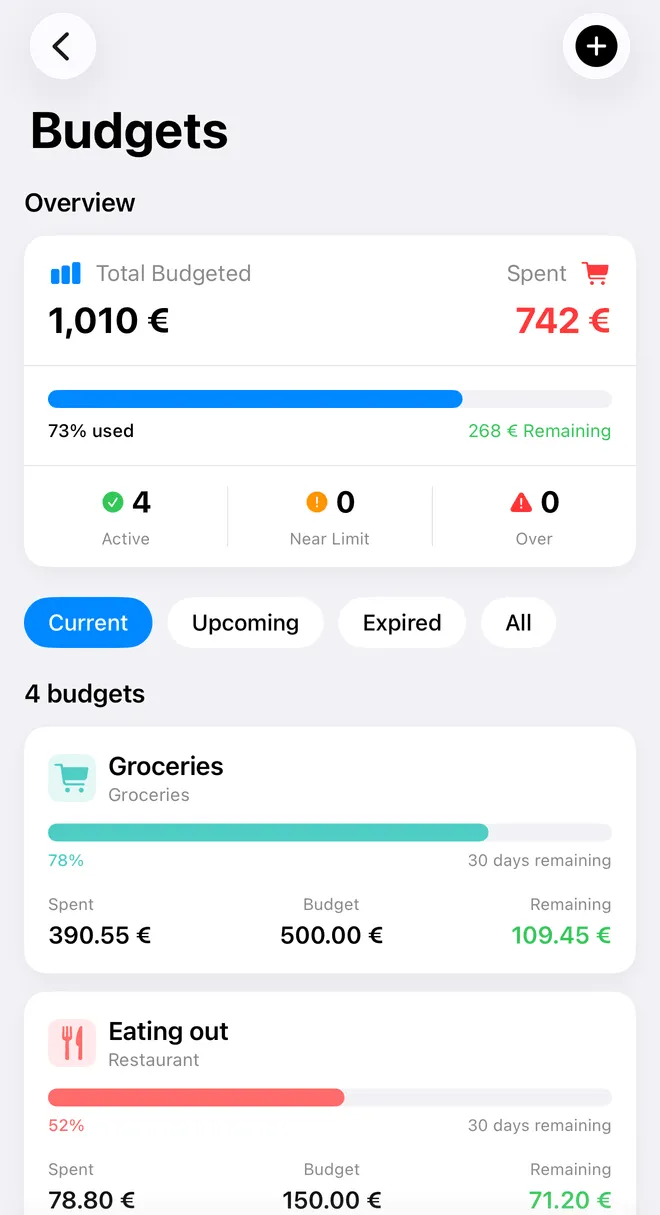 FinaPrism’s Budgets screen (demo data).
With Premium (7-day free trial), FinaPrism also spots recurring payments by itself in your transactions, merchant by merchant, and gathers them on its Subscriptions & Recurring Fees screen, with the total monthly cost and a calendar of upcoming payments. No bank connection, no ads, no ad tracking.