A subscription is something you decide once and pay for every month. That’s the whole appeal, and the whole trap: after a few months, you stop seeing it. A streaming service taken out for one series, an app you tried on a free trial, a gym membership from January… One by one, the amounts are small. Added up over a year, they’re not. Here’s how to find and cancel subscriptions you’ve stopped noticing, in three steps: take stock, work out the real cost, then decide.
1. Find every subscription you pay for
Subscriptions hide in several places. Go through them one at a time:
- Your bank statements for the last three months: highlight every direct debit and card payment that repeats, however small. Some subscriptions are quarterly or annual: for those, go back twelve months. To get your statements, see Track spending without linking your bank.
- Your App Store subscriptions: on iPhone, open Settings, then your name, then Subscriptions. Every subscription taken out in an app is listed there, with its renewal date.
- Payments through a middleman: a PayPal account, or a card saved with a merchant, can carry automatic payments that only show on your statement under the middleman’s name.
- The cards on your other accounts: a forgotten subscription is often on the card you use least.
Think of every kind: streaming, music, news, cloud storage, apps, games, the gym, broadband, your mobile contract, insurance, delivery passes, software, subscription boxes.
2. Work out the real cost
Convert each subscription to a monthly figure, then look at the total over a year. The yearly figure is the one that makes people sit up. Take an example of eight subscriptions, all perfectly ordinary:
| Subscription | Price | Per month |
|---|---|---|
| Streaming service | €13.49 a month | €13.49 |
| Second streaming service | €8.99 a month | €8.99 |
| Music | €11.99 a month | €11.99 |
| Online news | €9.99 a month | €9.99 |
| Cloud storage | €2.99 a month | €2.99 |
| Gym | €29.90 a month | €29.90 |
| Meditation app | €69.99 a year | €5.83 |
| Unlimited delivery pass | €49 a year | €4.08 |
| Total | €87.26 a month |
That’s about €1,047 a year. None of these subscriptions is unreasonable on its own. It’s the total, rarely looked at, that sometimes is.
3. Decide which to keep, and cancel the rest
For each line, ask four questions:
- Did I use it this month? If the answer is no two months running, it’s probably one too many.
- Do I have two services doing the same job? Two streaming platforms, two cloud storage plans, two music apps in the same household.
- Is there a plan that suits me better? A shared family plan, a cheaper annual price for what you’ll definitely keep, a plan without the extras.
- Can I stop it and pick it up again later? Many services can be cancelled and restarted in two minutes. Pausing streaming for three months a year, until a new season comes out, costs nothing.
To cancel, go back to where you subscribed: the App Store for an app subscription, the service’s own website otherwise. Make a note of the end date: a cancelled subscription often stays active until the end of the period you’ve already paid for.
The three traps that keep coming back
- The free trial that turns into a paid plan. When you start a trial, set a reminder for the day before it ends, and decide on that day.
- Silent price rises. A price that goes up by a euro doesn’t stand out on a statement. Compare what is taken now with what was taken a year ago.
- Duplicate subscriptions in one household. Everyone pays for their own, when a family plan would cover everybody.
Going through the list once a year is enough, ideally at the same time each year, in January for instance.
And with FinaPrism
With Premium (7-day free trial), FinaPrism works as a subscription tracker: it spots recurring payments by itself in your transactions, merchant by merchant, and gathers them on its Subscriptions & Recurring Fees screen, with the total monthly cost and a calendar of upcoming payments, so nothing catches you out.
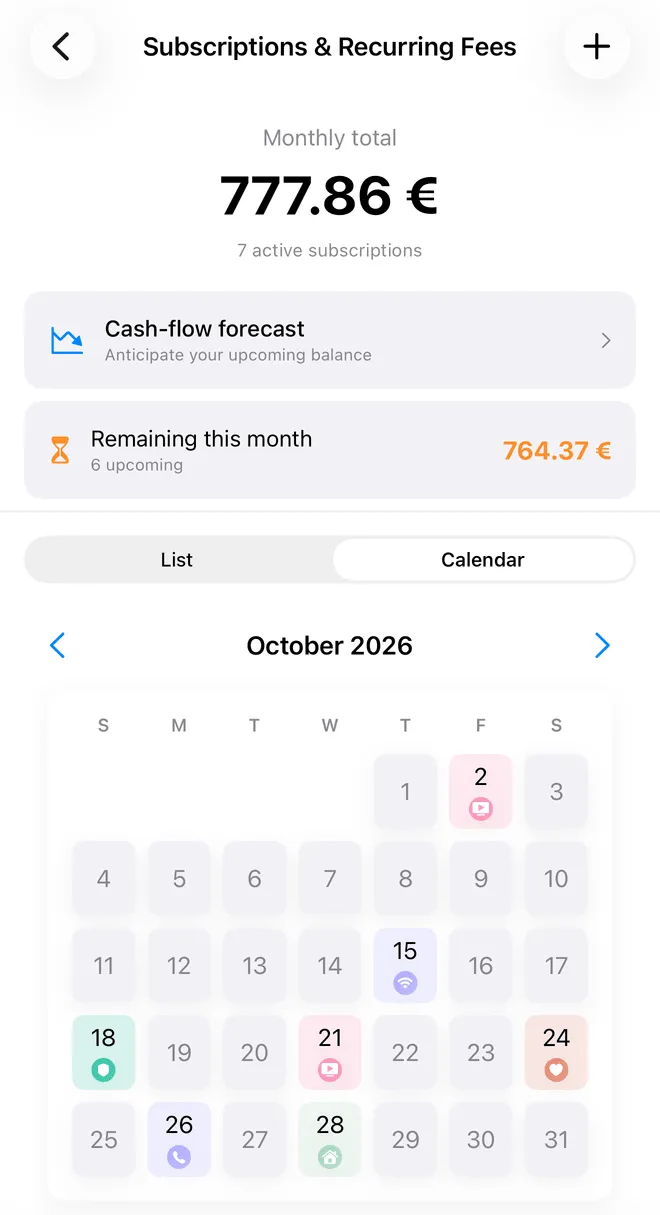 FinaPrism’s Subscriptions & Recurring Fees screen (demo data).
Your transactions come in through statement import, also included in Premium (PDF, CSV, photo or screenshot), without connecting your bank, or you can enter them by hand. No ads, no trackers.